Monday, December 18, 2023

Use predefined variables to return values

Dynamic Variable

Postman uses the Faker library to generate sample data, including random names, addresses, email addresses, and much more. You can use these pre-defined variables multiple times to return different values per request.

You can use these variables like any other variable in Postman. Their values are generated at the time of execution and their names start with a $ symbol, for example, $randomFirstName, $randomLastName$guid, or $timestamp.


Some examples used in real scenarios


Reference Link:


Wednesday, July 26, 2023

API Automation using newman

Newman is a command-line tool that allows you to automate the execution of Postman collections. 

Postman is an API development environment that enables you to design, test, and document APIs.

Newman comes in handy when you want to run your API tests in a Continuous Integration (CI) pipeline or automate API testing.


To get started with API automation using Newman, follow these steps:

1. Install Node.js and npm:

    Ensure you have Node.js and npm (Node Package Manager) installed on your machine. You can download the latest version from the official Node.js website.


2. Install Postman and create a collection:

   If you haven't already, download and install Postman from the official website. Then, create a collection and add API requests with associated test scripts to it.


3. Export the collection:

   Once you have created and saved your collection in Postman, export it as a JSON file. This file will contain all the API requests, test scripts, and other relevant information.


4. Install Newman:

   Open your terminal or command prompt and install Newman globally using npm:

   ```

   npm install -g newman

   ```

5. Run the collection with Newman:

   In your terminal, navigate to the directory where you saved the exported collection (JSON file) and execute the following command:

   ```

   newman run your_collection.json

   ```

   Replace `your_collection.json` with the actual name of your exported collection file.

   Newman will execute each request in the collection and display the results in the terminal.


6. Writing test scripts:

   If your collection has test scripts, Newman will run them automatically. You can write test scripts using JavaScript in the Postman collection. These scripts allow you to perform various validations on the API responses and make sure they meet the expected criteria.


7. Using Newman in CI/CD pipelines:

   To incorporate Newman into your CI/CD pipeline, install Newman on the build server and run the collection as part of your test suite. This helps ensure that your APIs are tested automatically whenever changes are made to the codebase.


Summarization 

Newman provides various options for generating reports, controlling iterations, and handling environment variables during the test run. You can explore the official Newman documentation for more advanced features and customization options.

Remember to keep your collection and test scripts up to date as your API evolves. Regularly update your tests to reflect the latest changes and ensure that your API remains functional and reliable.

Monday, July 17, 2023

API performance testing in Postman

API performance testing involves simulating real-world traffic and observing your API’s resulting behavior. It is conducted to evaluate how well an API meets performance expectations for response time, throughput, and availability under the simulated load.

API performance testing can help you:

  1. Ensure your API can handle the expected load and check how the API responds to changes in load (load is the number of parallel users hitting your APIs at the same time).

  2. Optimize and improve the API’s performance to ensure a better user experience.

  3. Identify any bottlenecks, latency, and failures and determine the scalability of the system.

Postman now has built-in capabilities for testing your API’s performance with your existing Postman Collections and requests. There are two core functionalities we will discuss in this post:

  1. Using Postman to simulate load by having multiple parallel virtual users hit your endpoints.

  2. Visualizing the performance of your APIs under the simulated load in real time. We will show you how to observe response times, throughput (requests hit per second), and error rates so you can keep tabs on your API performance metrics.

How to use Postman for API performance testing

You can use Postman’s Collection Runner to set up a performance test in Postman by following these steps:

Step 1: Select a collection, select an environment (optional), and click Run:

If you do not have a collection, read more about how you can quickly create one in Postman.

Please note that Postman will also execute all of your pre-request and test scripts along with the requests.

Step 2: Select the Performance tab under Runner, specify the load settings, and click Run:

Step 3: Observe the response times and error rate in real time:

You can toggle on the legend to view requests per second as well.

Step 4: Once the run is completed, observe and identify bottlenecks in response times and requests per second:

How to configure the load to simulate real-world traffic

You can now use the Collection Runner to simulate real-world traffic. You will be able to specify the following inputs to simulate the load condition:

  • Virtual users (VUs): The maximum number of parallel users you want to simulate.

  • Test duration: The amount of time (in minutes) for which you want to run the test.

  • Load profile: The intensity of the load during the test’s duration. We currently support two load profiles:

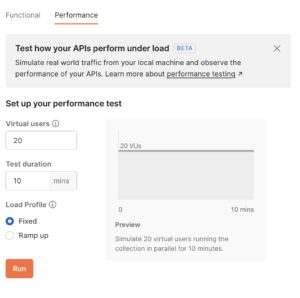
    1. “Fixed” load profile: This will apply a fixed number of virtual users throughout the test duration:

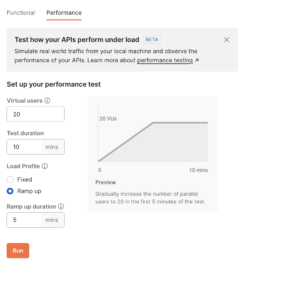
    2. “Ramp up” load profile: This will slowly increase the number of virtual users during the “ramp up duration” to reach the specified load. Once reached, this number of virtual users will be maintained for the remaining duration:

Reference

  • https://blog.postman.com/postman-api-performance-testing/

Use predefined variables to return values

Dynamic Variable Postman uses the  Faker library  to generate sample data, including random names, addresses, email addresses, and much more...